 ModelBusiness
Build a five-year financial plan in minutes.
Model a business or create a household budget from ready-made templates. See profit, cash and return update as you type — privately, on your device.
Now available on the App Store and Google Play — for iPhone, iPad and Android.
A$19.99 once · No subscription · No account · Works offline
From an idea to a clear answer in minutes
No spreadsheet, no setup. Start from a template and get to a useful first result quickly.
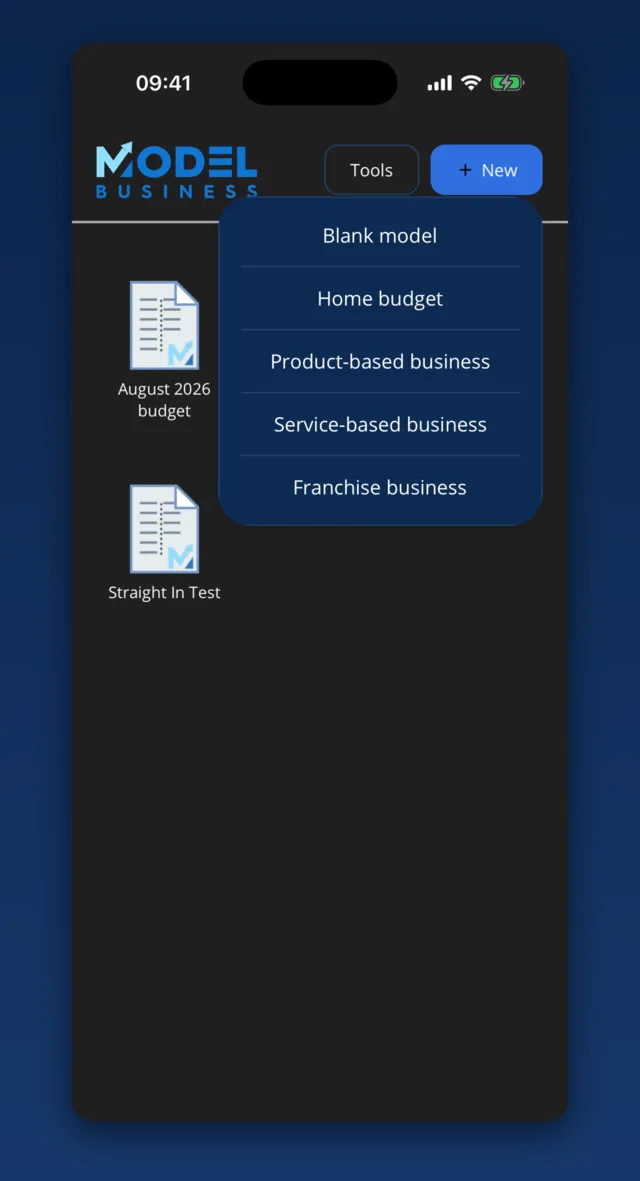
Choose a starting point
Pick a trade, business, franchise or household template — a plumber, electrician, hairdresser, cleaner and more, or a broader starter. The categories and structure are laid out for you from the first screen.
Add your numbers
Tap a line, type an amount. Months and running totals sort themselves out; sections roll up as you go.
Test and share
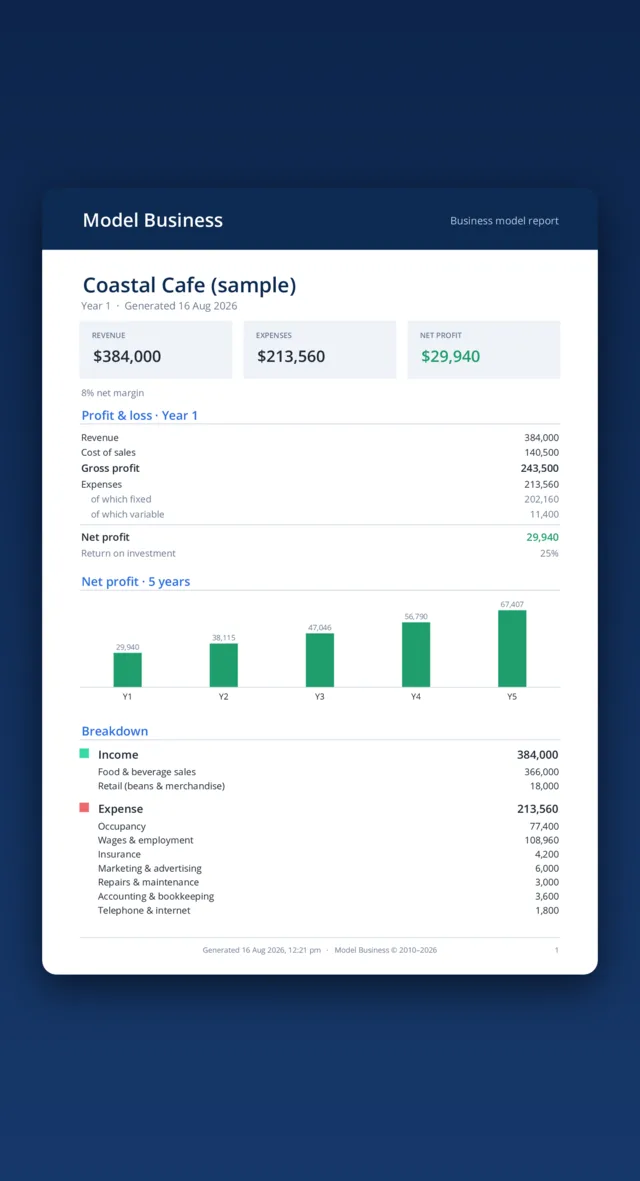
Compare what-if scenarios, read your five-year outlook, then export a polished PDF or email the model.
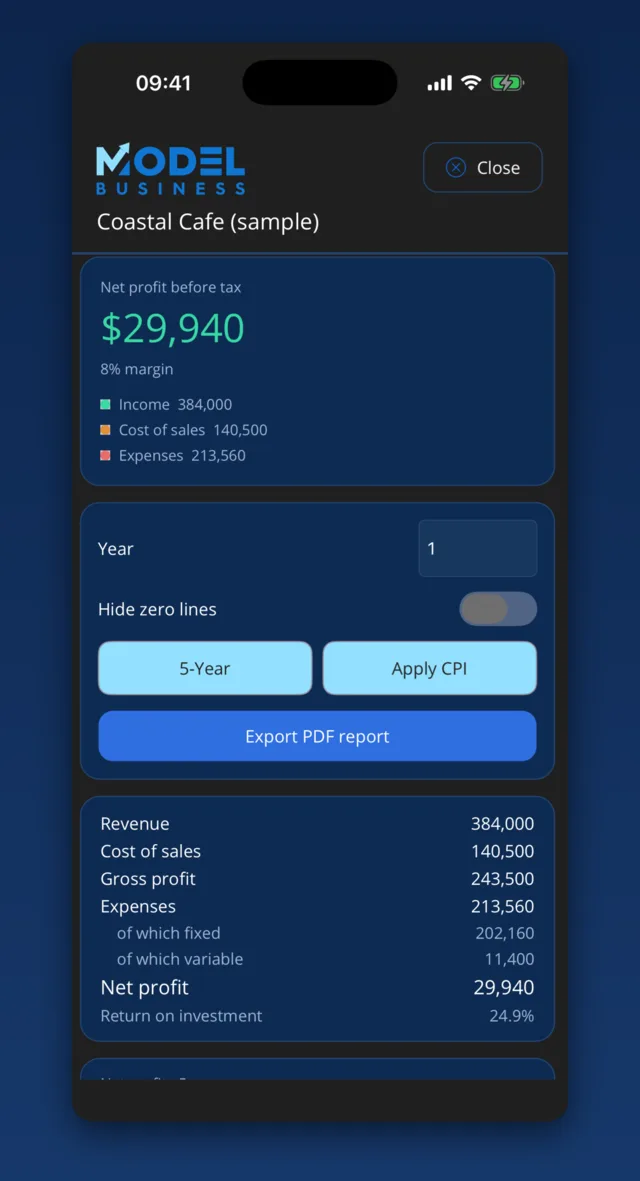
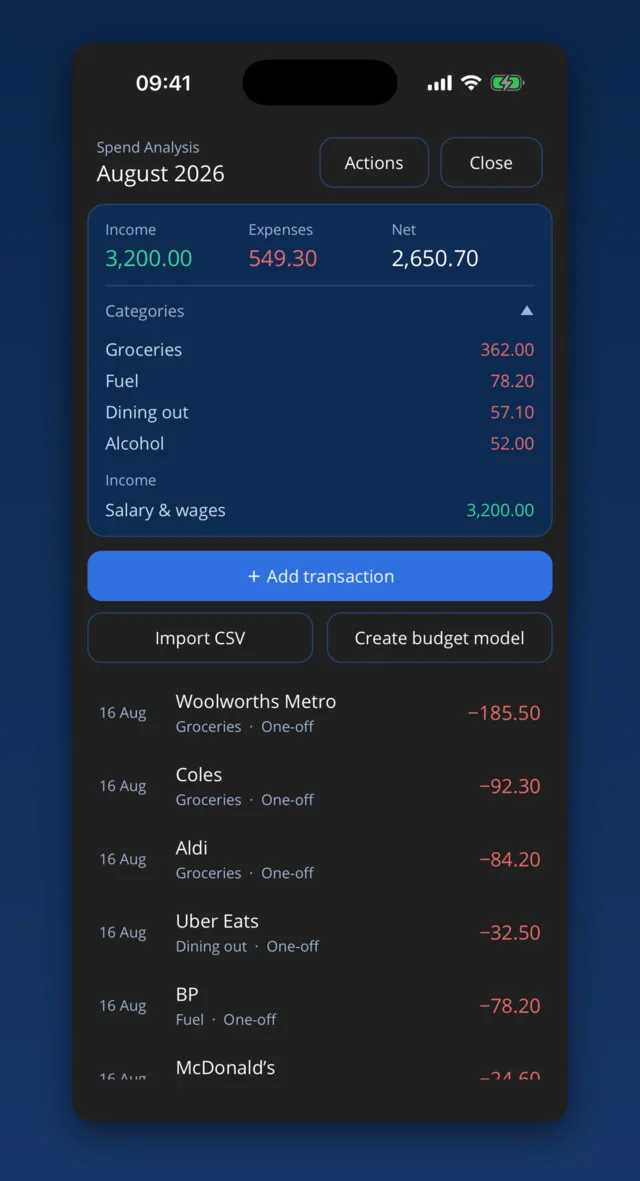
Real screens, from template to finished report
Genuine screenshots from the app. Figures use the built-in “Coastal Cafe” sample and are illustrative.
Runs a business plan and a household budget — and speaks each language
ModelBusiness knows the difference. A business shows revenue, gross profit and return on investment; a household budget quietly switches to income, expenses and net surplus — no jargon you don't need.
Founders & owners
Pressure-test a new venture, a franchise purchase or next year's plan. See profit, margin, cash and ROI five years out before you commit a dollar.
Families & individuals
Build a household budget from a ready-made list of categories, track income against expenses, and watch your net surplus — or shortfall — take shape.
Accountants & mentors
Hand a client a starting model, review the PDF they send back, and iterate together — everything portable in a single file. With Advisor Link, put your own brand and templates in their app.
Everything you need to plan the numbers
From the first estimate to a polished report you can hand to your accountant — without ever leaving the app.
Model five years from a ready-made template
Start from a home, product, service or franchise template — or a trade starter built for plumbers, electricians, hairdressers, cleaners, gardeners and more. Categories, structure and fixed/variable costs are already in place. Type an annual figure and it spreads across the months; the profit-and-loss, five-year trend and return on investment move the moment you do.
- Home, product, service, franchise & a dozen trade starters
- Yearly amounts auto-spread to months, with a live P&L and ROI
- Project Years 2–5 by growing revenue and inflating costs
Model your income, then pressure-test it
Build revenue from quantity, price and unit cost, then calculate the sales needed to break even or reach a profit target. Save and compare named income scenarios while keeping shared expenses unchanged.
- Quantity × price × unit cost modelling
- Solve for breakeven or a profit target
- Compare named scenarios side by side
A report worth sending
Export a clean, branded PDF — key figures, a full P&L, a five-year chart and a line-by-line breakdown, dated automatically. Or email the whole model to a partner or accountant; they open it straight in ModelBusiness.
- One-tap PDF with charts and totals
- Email a model, import it in a tap
- Duplicate-safe: never overwrites your work
Turn real spending into a budget
Import a CSV from supported Australian banks — one month or several — or add entries by hand. ModelBusiness recognises the merchant and files it (Aldi → Groceries, Ampol → Fuel), groups by month with a switchable monthly average, then turns it into a budget model in a tap.
- Import a month or several — grouped by month
- Merchants auto-sorted into categories
- Turn your spending into a budget in one tap
Cost out your team, properly
Can I actually afford to hire this person? Add an employee and ModelBusiness works out the real cost — gross wage, superannuation and WorkCover — and drops it straight into your expenses, so you see what a hire does to your profit before you make it.
- Wages, super and WorkCover grouped neatly per employee
- Super defaults to 12%; override any figure
- Reopen an employee, change the wage and the model recalculates
Australian figures, business models only. PAYG is withheld from the wage, not added again — so it isn’t double-counted.
Useful tools when you need them
Loan tracker
See the full repayment schedule and test how extra payments change the payoff date.
Calculators
Work out wages and on-costs, ROI and breakeven without leaving your model. The same wages calculation can be added straight to a business model as an employee.
Flexible years
Report by calendar or financial year and choose the starting month.
Private Apple sync
Optionally sync encrypted models through your own iCloud account.
Money I'm owed
Keep a private running record of amounts lent and repayments received, with dates and notes.
Fast model management
Duplicate models and reorder line items in a tap.
Private by default, with optional Apple sync
Models are stored in an AES-256 encrypted database on your device. There is no ModelBusiness account, analytics service or company-operated data server. On iPhone and iPad, you can optionally sync encrypted models through your own iCloud account; the encryption key is synchronised through iCloud Keychain. Sync is off by default, and Silent Services cannot access your models.
- AES-256 encrypted storage on your device
- No ModelBusiness account, login or in-app analytics
- Optional encrypted iCloud sync for iPhone and iPad
- Works offline; sync is not required
Sharing a model? An emailed model is packaged so another ModelBusiness app can open it — so send it only to people you'd trust with the numbers, like any attachment. Read the privacy policy →
Made in Australia by Silent Services Pty Ltd
ModelBusiness is built and supported by Silent Services Pty Ltd. There's no venture backing and no data business behind it — you buy the app once and own your models. Questions before you buy? Talk to support.
Pay once. Plan as often as you like.
Get every template, calculator, report and five-year projection for A$19.99. No subscription and no in-app purchases.
Everything unlocked from the start. No subscription, ever.
- Unlimited models & five-year projections
- All templates, calculators and the loan tracker
- PDF reports, printing, email & model sharing
- Updates to your purchased app included. No in-app purchases
Launch price shown in Australian dollars. Store prices are set per region at launch. One App Store purchase covers your iPhone and iPad on the same Apple ID; Android is a separate purchase on Google Play.
Good to know
Do I need an account?
No. There's nothing to sign up for and no password to remember — open the app and start a model.
Where is my data stored?
On your device, in an encrypted database (SQLCipher / AES-256). There's no ModelBusiness server and nothing is uploaded. On iPhone and iPad you can optionally sync encrypted models through your own iCloud account; it's off by default.
Is it a subscription?
No. ModelBusiness is a single one-time purchase with no in-app purchases. Buy it once and every feature is unlocked, including updates to the app you bought.
Do I pay once for all my devices?
One purchase on the App Store covers your iPhone and iPad on the same Apple ID. Android is a separate purchase on Google Play, in line with how each store works.
Can I sync across Apple devices?
Yes, optionally, on iPhone and iPad. Turn on iCloud sync in Settings and your encrypted models sync through your own iCloud account — the key is carried by iCloud Keychain, so nothing is ever sent to us. It's off by default. On any device you can also email or AirDrop a model to move it across.
Can I import a bank statement?
Yes. In Spend Analysis, import a CSV export — supported Australian bank formats are recognised automatically — for one month or several at once. Each transaction is sorted into a category, the file is read entirely on your device (nothing is uploaded), and you can turn the spending into a budget model with one tap.
Does ModelBusiness handle wages and super?
Yes. In a business model you can add employees directly to an expense section. Enter the gross wage, superannuation and WorkCover rate and ModelBusiness works out the total cost to employer and includes it in the model. Super defaults to 12% and can be changed. PAYG is already part of the gross wage, so it isn’t added again. It’s a planning figure, not payroll — it doesn’t produce payslips.
Is there a template for my trade?
There are ready-made starters for plumbers, electricians, barber/hairdressers, nail salons, gardeners, handymen, pool cleaners, house cleaners, painters/decorators, mobile mechanics, dog groomers and personal trainers — each with trade-specific income and cost lines already laid out — alongside the broader business, franchise and household templates.
Does it work outside Australia?
Yes. In Settings, choose your country and the currency, the name for sales tax (GST, VAT or Sales Tax) and your financial-year start month adjust to match. Bank-CSV recognition is currently designed for supported Australian bank exports; manual transaction entry remains available elsewhere, and the built-in wages calculator uses Australian on-costs.
Can I share a model?
Yes. Email a model straight from the app and the recipient opens the attachment — it imports as a new model in their copy of ModelBusiness. A shared file is packaged so another ModelBusiness app can read it, so send it only to people you'd trust with the numbers, like any attachment.
Which devices are supported?
iPhone, iPad and Android phones and tablets, with a layout that adapts from a single column on phones to a side-by-side insight panel on tablets.
Build your first plan in minutes.
A$19.99 once. No subscription or account. Private by default.
Available now on the App Store and Google Play.